
<?xml version="1.0" encoding="utf-8"?>
<feed xmlns="http://www.w3.org/2005/Atom">
    <title>GENOVA　CMS　操作マニュアル</title>
    <link rel="alternate" type="text/html" href="http://www.business-blog.biz/" />
    <link rel="self" type="application/atom+xml" href="http://www.business-blog.biz/atom.xml" />
   <id>tag:www.business-blog.biz,2008://42</id>
    <link rel="service.post" type="application/atom+xml" href="http://www.business-blog.biz/cgi-bin/mt/mt-atom.cgi/weblog/blog_id=42" title="GENOVA　CMS　操作マニュアル" />
    <updated>2008-03-21T06:54:48Z</updated>
    
    <generator uri="http://www.sixapart.com/movabletype/">Movable Type  3.21-ja</generator>
 
<entry>
    <title>共通ブログ</title>
    <link rel="alternate" type="text/html" href="http://www.business-blog.biz/0821_531.php" />
    <link rel="service.edit" type="application/atom+xml" href="http://www.business-blog.biz/cgi-bin/mt/mt-atom.cgi/weblog/blog_id=42/entry_id=531" title="共通ブログ" />
    <id>tag:www.business-blog.biz,2008:/manual//42.531</id>
    
    <published>2008-02-21T10:42:37Z</published>
    <updated>2008-03-05T07:42:51Z</updated>
    
    <summary>こちらは実際のサイト上には反映されません。 SEO対策では重要な部分です。 ...</summary>
    <author>
        <name>airage</name>
        
    </author>
            <category term="共通部分について" />
    
    <content type="html" xml:lang="ja" xml:base="http://www.business-blog.biz/">
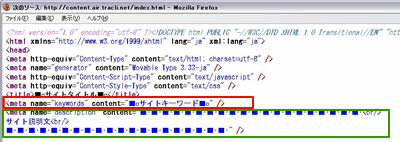
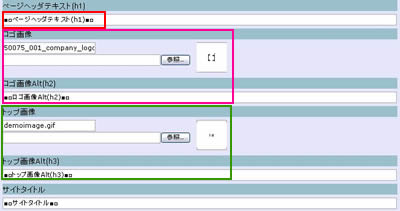
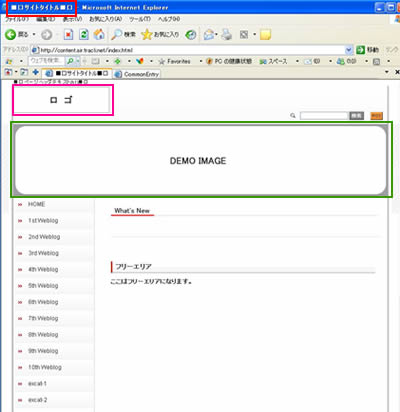
        <![CDATA[<span style="font-size: 14px">こちらは実際のサイト上には反映されません。<br />
SEO対策では重要な部分です。<br /></span>
<br />
<table border="0">
<tbody><tr><td><span style="font-size: 14px">
<img width="400" height="133" border="0" alt="meta" src="/images/kyoutsu/meta.jpg" />
<br />
</span></td></tr><tr><td><span style="font-size: x-small">
<img width="210" height="70" border="0" alt=" " src="http://www.business-blog.biz/images/yajirushi_d.jpg" />
</span></td></tr><tr><td><span style="font-size: x-small">
<img width="400" height="142" border="0" alt="mrta" src="/images/kyoutsu/meta2.jpg" />
</span></td></tr></tbody>
</table>
]]>
        
    </content>
</entry>
<entry>
    <title>共通ブログ</title>
    <link rel="alternate" type="text/html" href="http://www.business-blog.biz/0821_532.php" />
    <link rel="service.edit" type="application/atom+xml" href="http://www.business-blog.biz/cgi-bin/mt/mt-atom.cgi/weblog/blog_id=42/entry_id=532" title="共通ブログ" />
    <id>tag:www.business-blog.biz,2008:/manual//42.532</id>
    
    <published>2008-02-21T10:51:31Z</published>
    <updated>2008-03-05T07:43:32Z</updated>
    
    <summary> ...</summary>
    <author>
        <name>airage</name>
        
    </author>
            <category term="共通部分について" />
    
    <content type="html" xml:lang="ja" xml:base="http://www.business-blog.biz/">
        <![CDATA[<table border="0">
<tbody><tr><td><span style="font-size: 12px">
<img width="400" height="211" border="0" alt="サイト上部" src="/images/kyoutsu/top.jpg" />
<br />
</span></td></tr><tr><td><span style="font-size: x-small">
<img width="210" height="70" border="0" alt=" " src="http://www.business-blog.biz/images/yajirushi_d.jpg" />
</span></td></tr><tr><td><span style="font-size: x-small">
<img width="400" height="412" border="0" alt="サイト上部" src="/images/kyoutsu/top2.jpg" />
</span></td></tr></tbody>
</table>
]]>
        
    </content>
</entry>
<entry>
    <title>レイアウトについて</title>
    <link rel="alternate" type="text/html" href="http://www.business-blog.biz/0822_534.php" />
    <link rel="service.edit" type="application/atom+xml" href="http://www.business-blog.biz/cgi-bin/mt/mt-atom.cgi/weblog/blog_id=42/entry_id=534" title="レイアウトについて" />
    <id>tag:www.business-blog.biz,2008:/manual//42.534</id>
    
    <published>2008-02-22T08:38:00Z</published>
    <updated>2008-03-05T07:47:07Z</updated>
    
    <summary><![CDATA[ &nbsp; レイアウト設定のそれぞれ設定したい画面をクリック。 記入。 「変...]]></summary>
    <author>
        <name>airage</name>
        
    </author>
            <category term="お問い合わせフォームについて" />
    
    <content type="html" xml:lang="ja" xml:base="http://www.business-blog.biz/">
        <![CDATA[
<table border="0">
<tbody><tr><td><span style="font-size: 14px">
<img width="350" height="331" border="0" alt="お問合せ" src="/images/contact/fms5.jpg" />
&nbsp;</span></td><td><span style="font-size: 14px">
<img width="287" height="132" border="0" alt="お問合せ" src="/images/contact/fms6.jpg" />
</span></td></tr></tbody>
</table>
<br />
<table width="368" border="0" style="height: 127px">
<tbody><tr><td><span style="font-size: 14px"><span style="font-size: 14px"><span style="font-size: 14px">
<img width="20" height="15" border="0" alt="1" src="http://www.business-blog.biz/images/p-001.gif" />
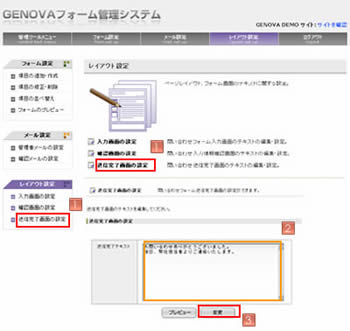
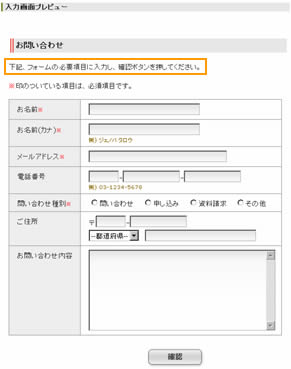
</span></span></span></td><td><span style="font-size: 14px">レイアウト設定のそれぞれ設定したい画面をクリック。</span></td></tr><tr><td><span style="font-size: 14px"><span style="font-size: 14px"><span style="font-size: 14px">
<img width="20" height="15" border="0" alt="2" src="http://www.business-blog.biz/images/p-002.gif" />
</span></span></span></td><td><span style="font-size: 14px">記入。</span></td></tr><tr><td><span style="font-size: 14px"><span style="font-size: 14px"><span style="font-size: 14px">
<img width="20" height="15" border="0" alt="3" src="http://www.business-blog.biz/images/p-003.gif" />
</span></span></span></td><td><span style="font-size: 14px">「</span><span style="font-size: 14px">変更」をクリック。</span></td></tr></tbody>
</table>
]]>
        
    </content>
</entry>
<entry>
    <title>レイアウトについて</title>
    <link rel="alternate" type="text/html" href="http://www.business-blog.biz/0822_535.php" />
    <link rel="service.edit" type="application/atom+xml" href="http://www.business-blog.biz/cgi-bin/mt/mt-atom.cgi/weblog/blog_id=42/entry_id=535" title="レイアウトについて" />
    <id>tag:www.business-blog.biz,2008:/manual//42.535</id>
    
    <published>2008-02-22T09:24:24Z</published>
    <updated>2008-03-05T07:48:33Z</updated>
    
    <summary><![CDATA[ &nbsp;&nbsp; レイアウト設定のそれぞれ設定したい画面をクリック。 ...]]></summary>
    <author>
        <name>airage</name>
        
    </author>
            <category term="お問い合わせフォームについて" />
    
    <content type="html" xml:lang="ja" xml:base="http://www.business-blog.biz/">
        <![CDATA[
<table border="0">
<tbody><tr><td><span style="font-size: 14px">
<img width="350" height="331" border="0" alt="お問合せ" src="/images/contact/fms3.jpg" />
&nbsp;</span></td><td><span style="font-size: 14px">&nbsp;
<img width="300" height="275" border="0" alt="お問合せ" src="/images/contact/fms4.jpg" />
</span></td></tr></tbody>
</table>
<br />
<table width="368" border="0" style="height: 136px">
<tbody><tr><td><span style="font-size: 14px"><span style="font-size: 14px"><span style="font-size: 14px">
<img width="20" height="15" border="0" alt="1" src="http://www.business-blog.biz/images/p-001.gif" />
</span></span></span></td><td><span style="font-size: 14px">レイアウト設定のそれぞれ設定したい画面をクリック。</span></td></tr><tr><td><span style="font-size: 14px"><span style="font-size: 14px"><span style="font-size: 14px">
<img width="20" height="15" border="0" alt="2" src="http://www.business-blog.biz/images/p-002.gif" />
</span></span></span></td><td><span style="font-size: 14px">記入。</span></td></tr><tr><td><span style="font-size: 14px"><span style="font-size: 14px"><span style="font-size: 14px">
<img width="20" height="15" border="0" alt="3" src="http://www.business-blog.biz/images/p-003.gif" />
</span></span></span></td><td><span style="font-size: 14px">「</span><span style="font-size: 14px">変更」をクリック。</span></td></tr></tbody>
</table>
]]>
        
    </content>
</entry>
<entry>
    <title>レイアウトについて</title>
    <link rel="alternate" type="text/html" href="http://www.business-blog.biz/0822_536.php" />
    <link rel="service.edit" type="application/atom+xml" href="http://www.business-blog.biz/cgi-bin/mt/mt-atom.cgi/weblog/blog_id=42/entry_id=536" title="レイアウトについて" />
    <id>tag:www.business-blog.biz,2008:/manual//42.536</id>
    
    <published>2008-02-22T09:28:28Z</published>
    <updated>2008-03-05T07:52:50Z</updated>
    
    <summary><![CDATA[ &nbsp;&nbsp; レイアウト設定のそれぞれ設定したい画面をクリック。 ...]]></summary>
    <author>
        <name>airage</name>
        
    </author>
            <category term="お問い合わせフォームについて" />
    
    <content type="html" xml:lang="ja" xml:base="http://www.business-blog.biz/">
        <![CDATA[
<table border="0">
<tbody><tr><td><span style="font-size: 14px">
<img width="350" height="331" border="0" alt="お問合せ" src="/images/contact/fms.jpg" />
&nbsp;</span></td><td>&nbsp;<span style="font-size: 14px">
<img width="291" height="369" border="0" alt="お問合せ" src="/images/contact/fms2.jpg" />
</span></td></tr></tbody>
</table>
<br />
<table width="368" border="0" style="height: 117px">
<tbody><tr><td><span style="font-size: 14px"><span style="font-size: 14px"><span style="font-size: 14px">
<img width="20" height="15" border="0" alt="1" src="http://www.business-blog.biz/images/p-001.gif" />
</span></span></span></td><td><span style="font-size: 14px">レイアウト設定のそれぞれ設定したい画面をクリック。</span></td></tr><tr><td><span style="font-size: 14px"><span style="font-size: 14px"><span style="font-size: 14px">
<img width="20" height="15" border="0" alt="2" src="http://www.business-blog.biz/images/p-002.gif" />
</span></span></span></td><td><span style="font-size: 14px">記入。</span></td></tr><tr><td><span style="font-size: 14px"><span style="font-size: 14px"><span style="font-size: 14px">
<img width="20" height="15" border="0" alt="3" src="http://www.business-blog.biz/images/p-003.gif" />
</span></span></span></td><td><span style="font-size: 14px">「</span><span style="font-size: 14px">変更」をクリック。</span></td></tr></tbody>
</table>
]]>
        
    </content>
</entry>
<entry>
    <title>メールについて</title>
    <link rel="alternate" type="text/html" href="http://www.business-blog.biz/0822_537.php" />
    <link rel="service.edit" type="application/atom+xml" href="http://www.business-blog.biz/cgi-bin/mt/mt-atom.cgi/weblog/blog_id=42/entry_id=537" title="メールについて" />
    <id>tag:www.business-blog.biz,2008:/manual//42.537</id>
    
    <published>2008-02-22T09:48:29Z</published>
    <updated>2008-03-07T09:11:17Z</updated>
    
    <summary>問い合わせがあった際、問い合わせ者へ送られるメール内容の設定を行います。 問い合...</summary>
    <author>
        <name>airage</name>
        
    </author>
            <category term="お問い合わせフォームについて" />
    
    <content type="html" xml:lang="ja" xml:base="http://www.business-blog.biz/">
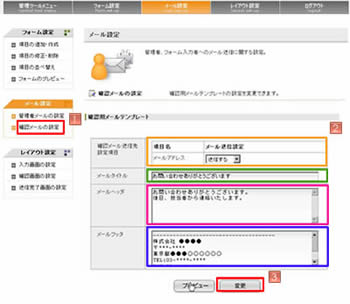
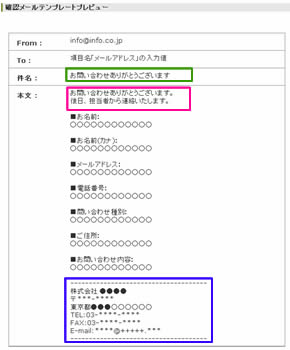
        <![CDATA[<span style="font-size: 14px">問い合わせがあった際、問い合わせ者へ送られるメール内容の設定を行います。<br />
問い合わせ者への確認メールの送信の有無や入力値項目の選択ができます。<br />
メールタイトル、本文のヘッダー、フッターを編集できます。</span><br />
<br />
<table border="0">
<tbody><tr><td><span style="font-size: 14px">
<img width="350" height="304" border="0" alt="お問合せ" src="/images/contact/fms7.jpg" />
&nbsp;</span></td><td><span style="font-size: 14px">
<img width="290" height="350" border="0" alt="お問合せ" src="/images/contact/fms8.jpg" />
</span></td></tr></tbody>
</table>
<span style="font-size: 14px"><br />
</span>
<table width="644" border="0" style="height: 191px">
<tbody><tr><td><span style="font-size: 14px"><span style="font-size: 14px"><span style="font-size: 14px">
<img width="20" height="15" border="0" alt="1" src="http://www.business-blog.biz/images/p-001.gif" />
</span></span></span></td><td><span style="font-size: 14px">メール設定の「確認メールも設定」をクリック。</span></td></tr><tr><td><span style="font-size: 14px"><span style="font-size: 14px"><span style="font-size: 14px">
<img width="20" height="15" border="0" alt="2" src="http://www.business-blog.biz/images/p-002.gif" />
<br />
<br />
<br />
<br />
</span></span></span></td><td><span style="font-size: 14px">それぞれに必要事項を記入。<br />
<br />
</span><span style="font-size: 14px">オレンジ枠内は問い合わせ内容の確認メール送信の可否を設定します。<br />
</span><span style="font-size: 12px">※設定項目として表示される項目はタイプテキストフィールドかつ検証タイプをE-Mailに設定している項目になります。</span><br />
</td></tr><tr><td><span style="font-size: 14px"><span style="font-size: 14px"><span style="font-size: 14px">
<img width="20" height="15" border="0" alt="3" src="http://www.business-blog.biz/images/p-003.gif" />
</span></span></span></td><td><span style="font-size: 14px">「</span><span style="font-size: 14px">変更」をクリック。</span></td></tr></tbody>
</table>
]]>
        
    </content>
</entry>
<entry>
    <title>メールについて</title>
    <link rel="alternate" type="text/html" href="http://www.business-blog.biz/0822_538.php" />
    <link rel="service.edit" type="application/atom+xml" href="http://www.business-blog.biz/cgi-bin/mt/mt-atom.cgi/weblog/blog_id=42/entry_id=538" title="メールについて" />
    <id>tag:www.business-blog.biz,2008:/manual//42.538</id>
    
    <published>2008-02-22T09:54:08Z</published>
    <updated>2008-03-05T07:55:20Z</updated>
    
    <summary>問い合わせがあった際、管理者へ送られるメール内容の設定を行います。 管理者のメー...</summary>
    <author>
        <name>airage</name>
        
    </author>
            <category term="お問い合わせフォームについて" />
    
    <content type="html" xml:lang="ja" xml:base="http://www.business-blog.biz/">
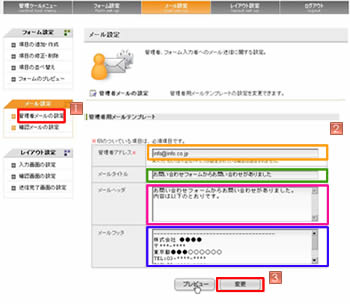
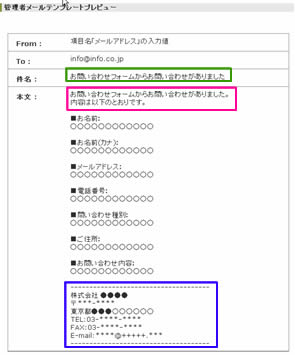
        <![CDATA[<span style="font-size: 14px">問い合わせがあった際、管理者へ送られるメール内容の設定を行います。<br />
管理者のメールアドレス設定、メールタイトル、本文のヘッダー、フッターを編集できます。</span><br />
<br />
<table border="0">
<tbody><tr><td><span style="font-size: 14px">
<img width="350" height="304" border="0" alt="お問合せ" src="/images/contact/fms9.jpg" />
&nbsp;</span></td><td><span style="font-size: 14px">
<img width="295" height="355" border="0" alt="お問合せ" src="/images/contact/fms10.jpg" />
</span></td></tr></tbody>
</table>
<span style="font-size: 14px"><br />
</span>
<table width="343" border="0" style="height: 135px">
<tbody><tr><td><span style="font-size: 14px"><span style="font-size: 14px"><span style="font-size: 14px">
<img width="20" height="15" border="0" alt="1" src="http://www.business-blog.biz/images/p-001.gif" />
</span></span></span></td><td><span style="font-size: 14px">メール設定の「管理者メールも設定」をクリック。</span></td></tr><tr><td><span style="font-size: 14px"><span style="font-size: 14px"><span style="font-size: 14px">
<img width="20" height="15" border="0" alt="2" src="http://www.business-blog.biz/images/p-002.gif" />
</span></span></span></td><td><span style="font-size: 14px">それぞれに必要事項を記入。</span></td></tr><tr><td><span style="font-size: 14px"><span style="font-size: 14px"><span style="font-size: 14px">
<img width="20" height="15" border="0" alt="3" src="http://www.business-blog.biz/images/p-003.gif" />
</span></span></span></td><td><span style="font-size: 14px">「</span><span style="font-size: 14px">変更」をクリック。</span></td></tr></tbody>
</table>
]]>
        
    </content>
</entry>
<entry>
    <title>フォームについて</title>
    <link rel="alternate" type="text/html" href="http://www.business-blog.biz/0822_539.php" />
    <link rel="service.edit" type="application/atom+xml" href="http://www.business-blog.biz/cgi-bin/mt/mt-atom.cgi/weblog/blog_id=42/entry_id=539" title="フォームについて" />
    <id>tag:www.business-blog.biz,2008:/manual//42.539</id>
    
    <published>2008-02-22T10:06:25Z</published>
    <updated>2008-03-05T08:00:46Z</updated>
    
    <summary> フォーム設定の「項目の並び替え」をクリック。 項目をドラッグ＆ドロップ*1で希...</summary>
    <author>
        <name>airage</name>
        
    </author>
            <category term="お問い合わせフォームについて" />
    
    <content type="html" xml:lang="ja" xml:base="http://www.business-blog.biz/">
        <![CDATA[<span style="font-size: 14px">
<img width="350" height="362" border="0" alt="お問合せ" src="/images/contact/fms11.jpg" />
</span><br />
<br />
<table width="674" border="0" style="height: 172px">
<tbody><tr><td><span style="font-size: 14px"><span style="font-size: 14px"><span style="font-size: 14px">
<img width="20" height="15" border="0" alt="1" src="http://www.business-blog.biz/images/p-001.gif" />
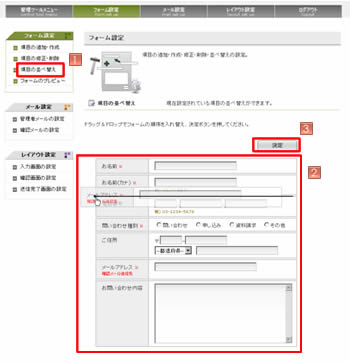
</span></span></span></td><td><span style="font-size: 14px">フォーム設定の「項目の並び替え」をクリック。</span></td></tr><tr><td><span style="font-size: 14px"><span style="font-size: 14px"><span style="font-size: 14px">
<img width="20" height="15" border="0" alt="2" src="http://www.business-blog.biz/images/p-002.gif" />
<br />
<br />
</span></span></span><br />
</td><td><span style="font-size: 14px">項目をドラッグ＆ドロップ*1で希望する順序に並べ替える。<br />
<br />
</span><span style="font-size: 12px">*1　変更したい項目の上でマウスの左のボタンを押し、変更したい位置にマウスを動かし、左のボタンをはなします。</span><br />
</td></tr><tr><td><span style="font-size: 14px"><span style="font-size: 14px"><span style="font-size: 14px">
<img width="20" height="15" border="0" alt="3" src="http://www.business-blog.biz/images/p-003.gif" />
</span></span></span></td><td><span style="font-size: 14px">「</span><span style="font-size: 14px">変更」をクリック。</span></td></tr></tbody>
</table>
<br />
]]>
        
    </content>
</entry>
<entry>
    <title>フォームについて</title>
    <link rel="alternate" type="text/html" href="http://www.business-blog.biz/0822_540.php" />
    <link rel="service.edit" type="application/atom+xml" href="http://www.business-blog.biz/cgi-bin/mt/mt-atom.cgi/weblog/blog_id=42/entry_id=540" title="フォームについて" />
    <id>tag:www.business-blog.biz,2008:/manual//42.540</id>
    
    <published>2008-02-22T10:14:27Z</published>
    <updated>2008-03-05T07:57:50Z</updated>
    
    <summary><![CDATA[ &nbsp; フォーム設定の「項目修正･削除」をクリック。 削除したい項目の右...]]></summary>
    <author>
        <name>airage</name>
        
    </author>
            <category term="お問い合わせフォームについて" />
    
    <content type="html" xml:lang="ja" xml:base="http://www.business-blog.biz/">
        <![CDATA[
<table border="0">
<tbody><tr><td><span style="font-size: 14px">
<img width="350" height="198" border="0" alt="お問合せ" src="/images/contact/fms12.jpg" />
</span><br />
</td><td>&nbsp;<span style="font-size: 14px">
<img width="300" height="143" border="0" alt="お問合せ" src="/images/contact/fms13.jpg" />
</span></td></tr></tbody>
</table>
<br />
<table width="451" border="0" style="height: 135px">
<tbody><tr><td><span style="font-size: 14px"><span style="font-size: 14px"><span style="font-size: 14px">
<img width="20" height="15" border="0" alt="1" src="http://www.business-blog.biz/images/p-001.gif" />
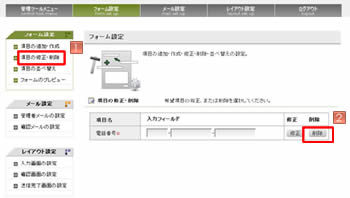
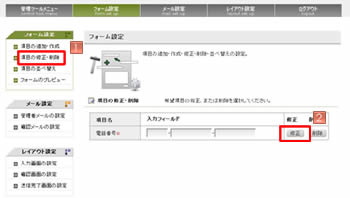
</span></span></span></td><td><span style="font-size: 14px">フォーム設定の「項目修正･削除」をクリック。</span></td></tr><tr><td><span style="font-size: 14px"><span style="font-size: 14px"><span style="font-size: 14px">
<img width="20" height="15" border="0" alt="2" src="http://www.business-blog.biz/images/p-002.gif" />
</span></span></span><br />
</td><td><span style="font-size: 14px">削除したい項目の右側にある「削除」をクリック。</span></td></tr><tr><td><span style="font-size: 14px"><span style="font-size: 14px"><span style="font-size: 14px">
<img width="20" height="15" border="0" alt="3" src="http://www.business-blog.biz/images/p-003.gif" />
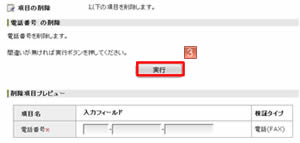
</span></span></span></td><td><span style="font-size: 14px">「</span><span style="font-size: 14px">実行」をクリック。</span></td></tr></tbody>
</table>
<br />
]]>
        
    </content>
</entry>
<entry>
    <title>フォームについて</title>
    <link rel="alternate" type="text/html" href="http://www.business-blog.biz/0822_541.php" />
    <link rel="service.edit" type="application/atom+xml" href="http://www.business-blog.biz/cgi-bin/mt/mt-atom.cgi/weblog/blog_id=42/entry_id=541" title="フォームについて" />
    <id>tag:www.business-blog.biz,2008:/manual//42.541</id>
    
    <published>2008-02-22T10:22:52Z</published>
    <updated>2008-03-05T07:57:18Z</updated>
    
    <summary><![CDATA[ &nbsp; フォーム設定の「項目修正･削除」をクリック。 修正したい項目の右...]]></summary>
    <author>
        <name>airage</name>
        
    </author>
            <category term="お問い合わせフォームについて" />
    
    <content type="html" xml:lang="ja" xml:base="http://www.business-blog.biz/">
        <![CDATA[
<table border="0">
<tbody><tr><td><span style="font-size: 14px">
<img width="350" height="198" border="0" alt="お問合せ" src="/images/contact/fms16.jpg" />
</span><br />
</td><td>&nbsp;<span style="font-size: 14px">
<img width="300" height="183" border="0" alt="お問合せ" src="/images/contact/fms15.jpg" />
</span></td></tr></tbody>
</table>
<br />
<table width="376" border="0" style="height: 141px">
<tbody><tr><td><span style="font-size: 14px"><span style="font-size: 14px"><span style="font-size: 14px">
<img width="20" height="15" border="0" alt="1" src="http://www.business-blog.biz/images/p-001.gif" />
</span></span></span></td><td><span style="font-size: 14px">フォーム設定の「項目修正･削除」をクリック。</span></td></tr><tr><td><span style="font-size: 14px"><span style="font-size: 14px"><span style="font-size: 14px">
<img width="20" height="15" border="0" alt="2" src="http://www.business-blog.biz/images/p-002.gif" />
</span></span></span><br />
</td><td><span style="font-size: 14px">修正したい項目の右側にある「修正」をクリック。</span></td></tr><tr><td><span style="font-size: 14px"><span style="font-size: 14px"><span style="font-size: 14px">
<img width="20" height="15" border="0" alt="3" src="http://www.business-blog.biz/images/p-003.gif" />
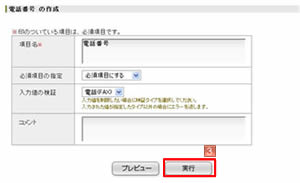
</span></span></span></td><td><span style="font-size: 14px">修正後、「</span><span style="font-size: 14px">実行」をクリック。</span></td></tr></tbody>
</table>
<br />
]]>
        
    </content>
</entry>
<entry>
    <title>フォームについて</title>
    <link rel="alternate" type="text/html" href="http://www.business-blog.biz/0822_542.php" />
    <link rel="service.edit" type="application/atom+xml" href="http://www.business-blog.biz/cgi-bin/mt/mt-atom.cgi/weblog/blog_id=42/entry_id=542" title="フォームについて" />
    <id>tag:www.business-blog.biz,2008:/manual//42.542</id>
    
    <published>2008-02-22T10:27:39Z</published>
    <updated>2008-03-05T08:04:28Z</updated>
    
    <summary><![CDATA[ &nbsp; フォーム設定の「項目の追加･作成」をクリック。 作成したい項目を...]]></summary>
    <author>
        <name>airage</name>
        
    </author>
            <category term="お問い合わせフォームについて" />
    
    <content type="html" xml:lang="ja" xml:base="http://www.business-blog.biz/">
        <![CDATA[
<table border="0">
<tbody><tr><td><span style="font-size: 14px"><span style="font-size: 14px">
<img width="350" height="238" border="0" alt="お問合せ" src="/images/contact/fms14.jpg" />
&nbsp;</span></span></td><td><span style="font-size: 14px"><span style="font-size: 14px">
<img width="300" height="183" border="0" alt="お問合せ" src="/images/contact/fms15.jpg" />
</span></span></td></tr></tbody>
</table>
<span style="font-size: 14px"><span style="font-size: 14px"><br />
</span></span>
<table width="511" border="0" style="height: 174px">
<tbody><tr><td><span style="font-size: 14px"><span style="font-size: 14px"><span style="font-size: 14px"><span style="font-size: 14px">
<img width="20" height="15" border="0" alt="1" src="http://www.business-blog.biz/images/p-001.gif" />
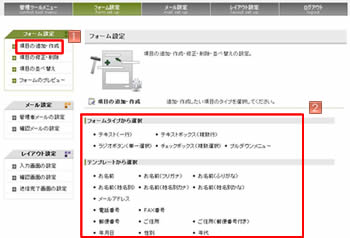
</span></span></span></span></td><td><span style="font-size: 14px"><span style="font-size: 14px">フォーム設定の「項目の追加･作成」をクリック。</span></span></td></tr><tr><td><span style="font-size: 14px"><span style="font-size: 14px"><span style="font-size: 14px"><span style="font-size: 14px">
<img width="20" height="15" border="0" alt="2" src="http://www.business-blog.biz/images/p-002.gif" />
</span></span></span></span></td><td><span style="font-size: 14px"><span style="font-size: 14px">作成したい項目をフォームタイプか、テンプレートから選択。</span></span></td></tr><tr><td><span style="font-size: 14px"><span style="font-size: 14px"><span style="font-size: 14px"><span style="font-size: 14px">
<img width="20" height="15" border="0" alt="3" src="http://www.business-blog.biz/images/p-003.gif" />
</span></span></span></span></td><td><span style="font-size: 14px"><span style="font-size: 14px">必要な部分を編集し、「実行」。</span></span></td></tr><tr><td><span style="font-size: 14px">&nbsp;</span></td><td><span style="font-size: 14px">他にも項目を追加する場合は</span><span style="font-size: 14px"><span style="font-size: 14px"><span style="font-size: 14px"><span style="font-size: 14px">
<img width="20" height="15" border="0" align="absmiddle" alt="1" src="http://www.business-blog.biz/images/p-001.gif" />
</span></span></span></span><span style="font-size: 14px">から再度作業をして下さい。<br />
</span></td></tr></tbody>
</table>
]]>
        
    </content>
</entry>
<entry>
    <title>FMS管理画面へログイン</title>
    <link rel="alternate" type="text/html" href="http://www.business-blog.biz/0822_543.php" />
    <link rel="service.edit" type="application/atom+xml" href="http://www.business-blog.biz/cgi-bin/mt/mt-atom.cgi/weblog/blog_id=42/entry_id=543" title="FMS管理画面へログイン" />
    <id>tag:www.business-blog.biz,2008:/manual//42.543</id>
    
    <published>2008-02-22T10:32:32Z</published>
    <updated>2008-03-05T08:05:47Z</updated>
    
    <summary>メインメニュー「GENOVA CMSメニュー」にある「GENOVAFMS」をクリ...</summary>
    <author>
        <name>airage</name>
        
    </author>
            <category term="お問い合わせフォームについて" />
    
    <content type="html" xml:lang="ja" xml:base="http://www.business-blog.biz/">
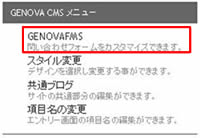
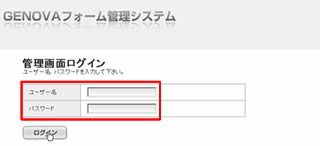
        <![CDATA[<span style="font-size: 14px">メインメニュー「GENOVA CMSメニュー」にある「GENOVAFMS」をクリックし、ユーザー名・パスワードを入力し、<br/>ログインします。</span><br />
<br />
<table border="0">
<tbody><tr><td>
<img width="200" height="138" border="0" alt="お問合せ" src="/images/contact/fms17.jpg" />
</td><td>
<img width="84" height="50" border="0" alt=" " src="/images/yajirushi.jpg" />
</td><td>
<img width="320" height="146" border="0" alt="お問合せ" src="/images/contact/fms18.jpg" />
<br />
</td></tr></tbody>
</table>
]]>
        
    </content>
</entry>
<entry>
    <title>デザインの変更</title>
    <link rel="alternate" type="text/html" href="http://www.business-blog.biz/0822_545.php" />
    <link rel="service.edit" type="application/atom+xml" href="http://www.business-blog.biz/cgi-bin/mt/mt-atom.cgi/weblog/blog_id=42/entry_id=545" title="デザインの変更" />
    <id>tag:www.business-blog.biz,2008:/manual//42.545</id>
    
    <published>2008-02-22T11:08:33Z</published>
    <updated>2008-03-05T08:10:57Z</updated>
    
    <summary><![CDATA[ スタイルキャッチャーの画面を開く。 &nbsp; &nbsp;&nbsp; 「...]]></summary>
    <author>
        <name>airage</name>
        
    </author>
            <category term="デザインについて" />
    
    <content type="html" xml:lang="ja" xml:base="http://www.business-blog.biz/">
        <![CDATA[
<table border="0">
<tbody><tr><td><span style="font-size: 14px">
<img width="20" height="15" border="0" alt="1" src="http://www.business-blog.biz/images/p-001.gif" />
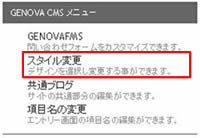
</span></td><td><span style="font-size: 14px">スタイルキャッチャーの画面を開く。<br />
</span></td></tr><tr><td><span style="font-size: 14px">&nbsp;</span></td><td><span style="font-size: 14px">
<img width="200" height="138" border="0" alt="スタイルキャッチャー" src="/images/style/style1.jpg" />
<br />
</span></td></tr><tr><td>&nbsp;</td><td>&nbsp;</td></tr><tr><td><span style="font-size: 14px">
<img width="20" height="15" border="0" alt="2" src="http://www.business-blog.biz/images/p-002.gif" />
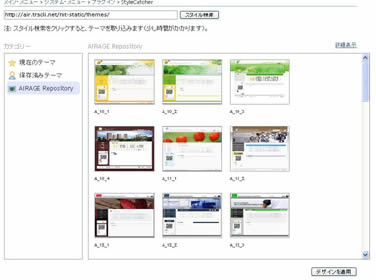
</span></td><td><span style="font-size: 14px">「スタイルの検索」をクリック。<br />
</span></td></tr><tr><td><span style="font-size: 14px">&nbsp;</span></td><td><span style="font-size: 14px">するとデザインが表示されます。<br />
</span><span style="font-size: 14px">
<img width="376" height="280" border="0" alt="スタイルキャッチャー" src="/images/style/style4.jpg" />
</span></td></tr><tr><td>&nbsp;</td><td>&nbsp;</td></tr><tr><td><span style="font-size: 14px">
<img width="20" height="15" border="0" alt="3" src="http://www.business-blog.biz/images/p-003.gif" />
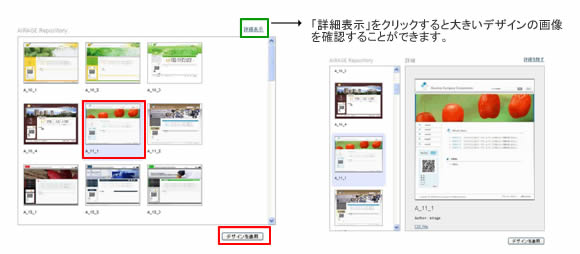
</span></td><td><span style="font-size: 14px">デザインを選択し、「デザインを適用」をクリック。<br />
</span></td></tr><tr><td><span style="font-size: 14px">&nbsp;</span></td><td><span style="font-size: 14px">
<img width="580" height="254" border="0" alt="スタイルキャッチャー" src="/images/style/style7.jpg" />
</span></td></tr><tr><td>&nbsp;</td><td>&nbsp;</td></tr><tr><td><span style="font-size: 14px">
<img width="20" height="15" border="0" alt="4" src="/images/p-004.gif" />
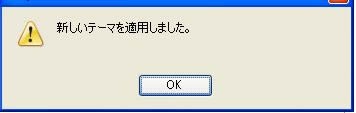
</span></td><td><span style="font-size: 14px">下図が表示されたら「OK」をクリックし、デザイン変更の完了です。<br />
</span></td></tr><tr><td><span style="font-size: 14px">&nbsp;</span></td><td><span style="font-size: 14px">
<img width="356" height="113" border="0" alt="スタイルキャッチャー" src="/images/style/style5.jpg" />
</span></td></tr><tr><td><span style="font-size: 14px">&nbsp;</span></td><td><span style="font-size: 14px">&nbsp;</span></td></tr><tr><td><span style="font-size: 14px">&nbsp;</span></td><td><span style="font-size: 14px">現在のテーマ　：　現在のサイトのデザイン<br />
保存済みのテーマ　：　サーバーに保存されているデザイン(過去に設定したデザイン)<br />
AIRAGE Repository　：　弊社の提供しているデザイン<br />
<br />
注：AIRAGE Repositoryは「スタイルの検索」をしないと出てきません。<br />
</span></td></tr></tbody>
</table>
]]>
        
    </content>
</entry>
<entry>
    <title>カテゴリーについて</title>
    <link rel="alternate" type="text/html" href="http://www.business-blog.biz/0821_662.php" />
    <link rel="service.edit" type="application/atom+xml" href="http://www.business-blog.biz/cgi-bin/mt/mt-atom.cgi/weblog/blog_id=42/entry_id=662" title="カテゴリーについて" />
    <id>tag:www.business-blog.biz,2008://42.662</id>
    
    <published>2008-03-21T03:08:26Z</published>
    <updated>2008-03-21T03:28:54Z</updated>
    
    <summary> カテゴリーの管理画面を開き、編集したいカテゴリーの名前をクリック。 &amp;nbsp...</summary>
    <author>
        <name>airage</name>
        
    </author>
            <category term="記事について" />
    
    <content type="html" xml:lang="ja" xml:base="http://www.business-blog.biz/">
        <![CDATA[
<table border="0">
<tbody><tr><td><span style="font-size: 14px">
<img width="20" height="15" border="0" alt="1" src="http://www.business-blog.biz/images/p-001.gif" />
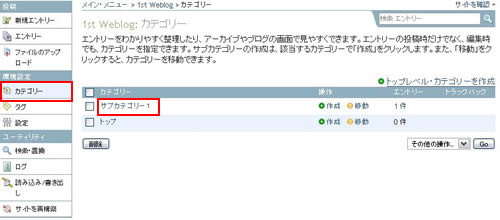
</span></td><td><span style="font-size: 14px">カテゴリーの管理画面を開き、編集したいカテゴリーの名前をクリック。<br />
</span></td></tr><tr><td><span style="font-size: 14px">&nbsp;</span></td><td><span style="font-size: 14px">
<img width="500" height="220" border="0" alt="カテゴリータイトルの編集" src="/images/kiji/cat15.jpg" />
</span></td></tr><tr><td>&nbsp;</td><td>&nbsp;</td></tr><tr><td><span style="font-size: 14px">
<img width="20" height="15" border="0" alt="2" src="http://www.business-blog.biz/images/p-002.gif" />
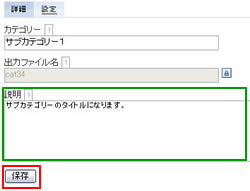
</span></td><td><span style="font-size: 14px">説明を編集し、保存する。<br />
</span></td></tr><tr><td><span style="font-size: 14px">&nbsp;</span></td><td><span style="font-size: 14px">
<img width="250" height="191" border="0" alt="カテゴリータイトルの編集" src="/images/kiji/cat16.jpg" />
</span></td></tr><tr><td>&nbsp;</td><td>&nbsp;</td></tr><tr><td><span style="font-size: 14px">
<img width="20" height="15" border="0" alt="3" src="http://www.business-blog.biz/images/p-003.gif" />
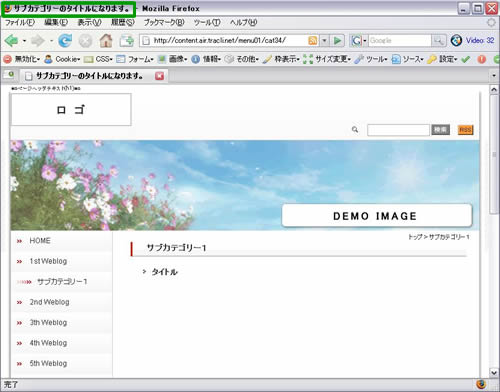
</span></td><td><span style="font-size: 14px">確認。<br />
</span></td></tr><tr><td><span style="font-size: 14px">&nbsp;</span></td><td><span style="font-size: 14px">
<img width="500" height="392" border="0" alt="カテゴリータイトルの編集" src="/images/kiji/cat17.jpg" />
</span></td></tr></tbody>
</table>
]]>
        
    </content>
</entry>
<entry>
    <title>表の枠線</title>
    <link rel="alternate" type="text/html" href="http://www.business-blog.biz/0821_663.php" />
    <link rel="service.edit" type="application/atom+xml" href="http://www.business-blog.biz/cgi-bin/mt/mt-atom.cgi/weblog/blog_id=42/entry_id=663" title="表の枠線" />
    <id>tag:www.business-blog.biz,2008://42.663</id>
    
    <published>2008-03-21T05:02:36Z</published>
    <updated>2008-03-21T06:54:48Z</updated>
    
    <summary><![CDATA[ 表の周りに線をつける&nbsp; 表の設定 全般 枠線 ：1&nbsp; &n...]]></summary>
    <author>
        <name>airage</name>
        
    </author>
            <category term="記事について" />
    
    <content type="html" xml:lang="ja" xml:base="http://www.business-blog.biz/">
        <![CDATA[
<table width="397" border="0" style="height: 64px">
<tbody><tr><td><span style="font-size: 14px"><span style="font-size: 14px">
<img width="20" height="15" border="0" alt="1" src="http://www.business-blog.biz/images/p-001.gif" />
</span></span></td><td colspan="4"><strong><span style="font-size: 14px">表の周りに線をつける</span></strong></td></tr><tr><td>&nbsp;</td><td rowspan="3"><span style="font-size: 14px"><span style="font-size: 14px">
<img width="20" height="20" border="0" align="absmiddle" alt="表の挿入" src="http://www.business-blog.biz/images/kiji/ww/table.gif" />
</span>表の設定</span><span style="font-size: 14px"><br />
</span></td><td><span style="font-size: 14px">全般<br />
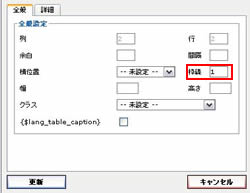
</span></td><td><span style="font-size: 14px">枠線<br />
</span></td><td><span style="font-size: 14px">：</span></td><td><span style="font-size: 14px">1&nbsp;</span></td><td rowspan="3"><span style="font-size: 14px"><span style="font-size: 14px">
<img width="84" height="28" border="0" alt="表の挿入" src="/images/yajirushi2.jpg" />
</span></span></td><td rowspan="3"><span style="font-size: 14px"><span style="font-size: 14px">
<img width="38" height="55" border="0" alt="表の挿入" src="/images/kiji/table12.jpg" />
</span></span></td></tr><tr><td>&nbsp;</td><td><span style="font-size: 14px">詳細：<br />
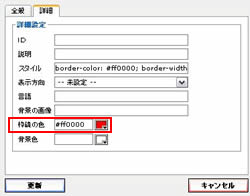
</span></td><td><span style="font-size: 14px">枠線の色<br />
</span></td><td><span style="font-size: 14px">：</span></td><td><span style="font-size: 14px">赤&nbsp;</span></td></tr></tbody>
</table>
<table border="0">
<tbody><tr><td><span style="font-size: 14px"><span style="font-size: 14px">
<img width="250" height="193" border="0" alt="表の挿入" src="/images/kiji/table10.jpg" />
</span></span></td><td><span style="font-size: 14px"><span style="font-size: 14px">
<img width="250" height="196" border="0" alt="表の挿入" src="/images/kiji/table11.jpg" />
</span><br />
</span></td></tr><tr><td colspan="2"><span style="font-size: 14px">※例えば枠線を「5」にすると&rArr;</span><span style="font-size: 14px"><span style="font-size: 14px">
<img width="45" height="68" border="0" align="absmiddle" alt="表の挿入" src="/images/kiji/table13.jpg" />
</span></span></td></tr></tbody>
</table>
<br />
<br />
<table border="0">
<tbody><tr><td><span style="font-size: 14px"><span style="font-size: 14px">
<img width="20" height="15" border="0" alt="2" src="http://www.business-blog.biz/images/p-002.gif" />
</span></span></td><td><strong><span style="font-size: 14px">表の周り、各マスの外側に線をつける</span></strong></td></tr></tbody>
</table>
<table width="554" border="0" style="height: 68px">
<tbody><tr><td>&nbsp;</td><td rowspan="2"><span style="font-size: 14px"><span style="font-size: 14px">
<img width="20" height="20" border="0" align="absmiddle" alt="表の挿入" src="http://www.business-blog.biz/images/kiji/ww/table.gif" />
</span>表の設定</span><span style="font-size: 14px"><br />
</span></td><td><span style="font-size: 14px">全般<br />
</span></td><td><span style="font-size: 14px">枠線<br />
</span></td><td><span style="font-size: 14px">：</span></td><td><span style="font-size: 14px">1&nbsp;</span></td><td rowspan="4"><span style="font-size: 14px"><span style="font-size: 14px">
<img width="84" height="28" border="0" alt="表の挿入" src="/images/yajirushi2.jpg" />
</span></span></td><td rowspan="4"><span style="font-size: 14px"><span style="font-size: 14px">
<img width="200" height="111" border="0" align="absmiddle" alt="表の挿入" src="/images/kiji/table15.jpg" />
</span></span></td></tr><tr><td>&nbsp;</td><td><span style="font-size: 14px">詳細<br />
</span></td><td><span style="font-size: 14px">枠線の色<br />
</span></td><td><span style="font-size: 14px">：</span></td><td><span style="font-size: 14px">赤&nbsp;</span></td></tr><tr><td>&nbsp;</td><td><span style="font-size: 14px">
<img width="20" height="20" border="0" align="absmiddle" alt=" " src="/images/kiji/ww/table_cell_props.gif" />
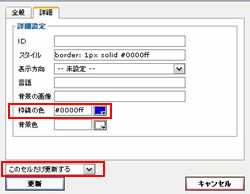
セルの設定</span></td><td><span style="font-size: 14px">詳細</span></td><td><span style="font-size: 14px">枠線の色</span></td><td><span style="font-size: 14px">：</span></td><td><span style="font-size: 14px">青</span></td></tr></tbody>
</table>
<table border="0">
<tbody><tr><td><span style="font-size: 14px"><span style="font-size: 14px">
<img width="250" height="193" border="0" alt="表の挿入" src="/images/kiji/table10.jpg" />
</span></span></td><td><span style="font-size: 14px"><span style="font-size: 14px">
<img width="250" height="194" border="0" align="absmiddle" alt="表の挿入" src="/images/kiji/table14.jpg" />
</span></span></td></tr><tr><td align="center"><span style="font-size: 14px">表の設定</span></td><td align="center"><span style="font-size: 14px">セルの設定</span></td></tr></tbody>
</table>
<br />
<br />
<table border="0">
<tbody><tr><td><span style="font-size: 14px"><span style="font-size: 14px">
<img width="20" height="15" border="0" alt="3" src="http://www.business-blog.biz/images/p-003.gif" />
</span></span></td><td><strong><span style="font-size: 14px">1本線の表を作る</span></strong></td></tr></tbody>
</table>
<table width="410" border="0" style="height: 80px">
<tbody><tr><td>&nbsp;</td><td><span style="font-size: 14px"><span style="font-size: 14px">
<img width="20" height="20" border="0" align="absmiddle" alt="表の挿入" src="http://www.business-blog.biz/images/kiji/ww/table.gif" />
</span>表の設定</span><span style="font-size: 14px"><br />
</span></td><td><span style="font-size: 14px">詳細<br />
</span></td><td><span style="font-size: 14px">背景色<br />
</span></td><td><span style="font-size: 14px">：</span></td><td><span style="font-size: 14px">赤&nbsp;</span></td><td rowspan="4"><span style="font-size: 14px"><span style="font-size: 14px">
<img width="84" height="28" border="0" alt="表の挿入" src="/images/yajirushi2.jpg" />
</span></span></td><td rowspan="4"><span style="font-size: 14px"><span style="font-size: 14px">
<img width="33" height="58" border="0" align="absmiddle" alt="表の挿入" src="/images/kiji/table18.jpg" />
</span></span></td></tr><tr><td>&nbsp;</td><td><span style="font-size: 14px">
<img width="20" height="20" border="0" align="absmiddle" alt=" " src="/images/kiji/ww/table_cell_props.gif" />
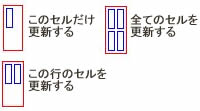
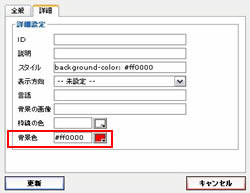
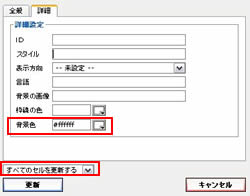
セルの設定</span></td><td><span style="font-size: 14px">詳細</span></td><td><span style="font-size: 14px">背景色</span></td><td><span style="font-size: 14px">：</span></td><td><span style="font-size: 14px">青</span></td></tr><tr><td>&nbsp;</td><td>&nbsp;</td><td colspan="4"><span style="font-size: 14px">全てのセルを更新する</span></td></tr></tbody>
</table>
<table border="0">
<tbody><tr><td><span style="font-size: 14px"><span style="font-size: 14px">
<img width="250" height="193" border="0" alt="表の挿入" src="/images/kiji/table16.jpg" />
</span></span></td><td><span style="font-size: 14px"><span style="font-size: 14px">
<img width="250" height="196" border="0" align="absmiddle" alt="表の挿入" src="/images/kiji/table17.jpg" />
</span></span></td></tr><tr><td align="center"><span style="font-size: 14px">表の設定</span></td><td align="center"><span style="font-size: 14px">セルの設定</span></td></tr></tbody>
</table>
<br />
<table border="0">
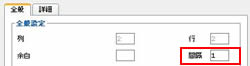
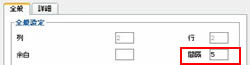
<tbody><tr><td colspan="3"><span style="font-size: 14px">※表の設定の全般で、間隔の数値を変える。<br />
</span></td></tr><tr><td><span style="font-size: 14px"><span style="font-size: 14px">
<img width="250" height="66" border="0" alt="表の挿入" src="/images/kiji/table19.jpg" />
</span></span></td><td rowspan="2"><span style="font-size: 14px"><span style="font-size: 14px">
<img width="84" height="28" border="0" alt="表の挿入" src="/images/yajirushi2.jpg" />
</span></span></td><td><span style="font-size: 14px"><span style="font-size: 14px">
<img width="32" height="51" border="0" alt="表の挿入" src="/images/kiji/table20.jpg" />
</span></span></td></tr><tr><td><span style="font-size: 14px"><span style="font-size: 14px">
<img width="250" height="65" border="0" alt="表の挿入" src="/images/kiji/table22.jpg" />
</span></span></td><td><span style="font-size: 14px"><span style="font-size: 14px">
<img width="43" height="63" border="0" alt="表の挿入" src="/images/kiji/table21.jpg" />
</span></span></td></tr></tbody>
</table>
]]>
        
    </content>
</entry>

</feed>